Describe the outcome
Start with a simple prompt. The task-aware enhancer can add useful composition and quality instructions without replacing your idea.
Choose Flare or Sunburst for the new model. This page still uses GPT Image 2.
See Images 2.5 and Sketch →PRO · QUALIFIED
A reasoning-led image model for demanding instructions, polished product scenes and controlled visual edits.
OWNER-APPROVED REAL OUTPUT
This is one paid 1024×1024 run using the same LUMA Night Serum prompt as the other model examples—no paid retry and no selected best-of batch.
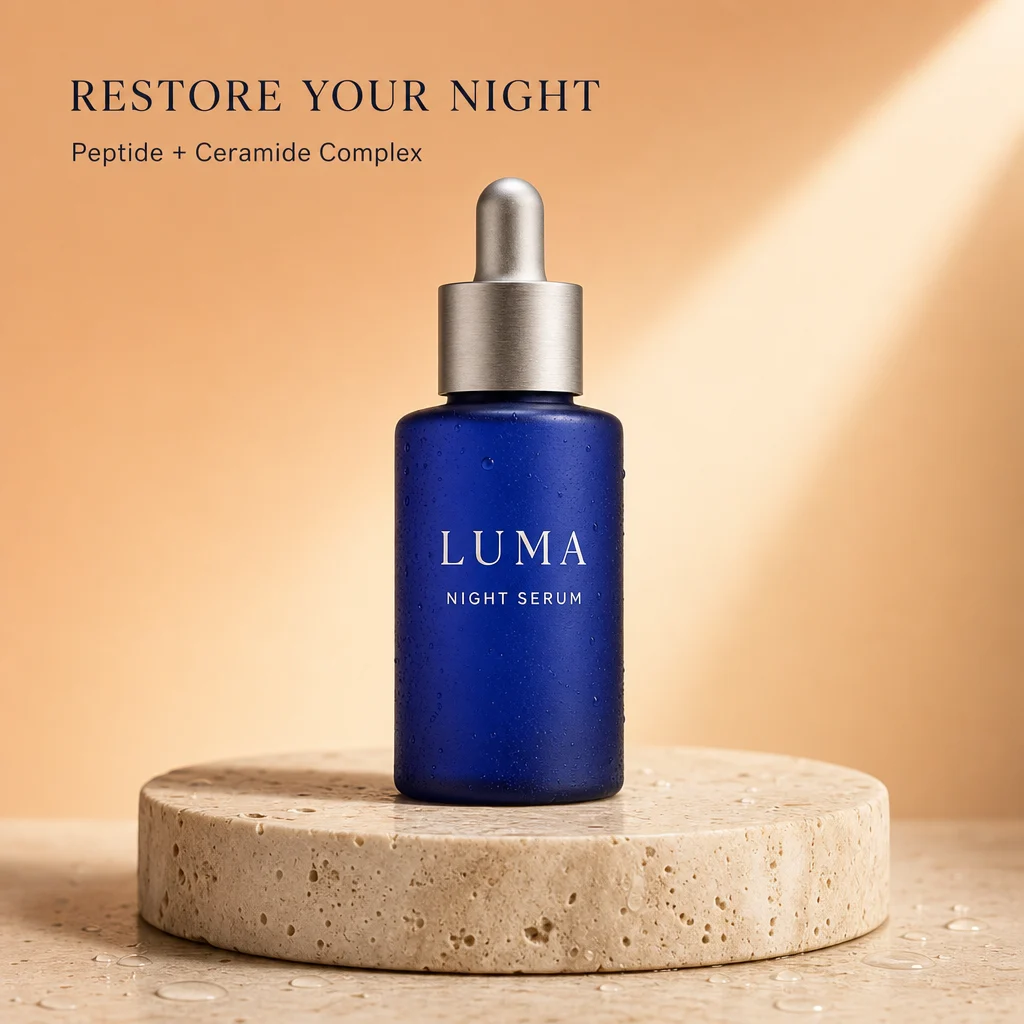
Start with a simple prompt. The task-aware enhancer can add useful composition and quality instructions without replacing your idea.
The exact credit cost is visible before generation. Failed or blocked jobs restore reserved credits once.
Results land in the same private creation history, even when you change models between attempts.
GPT Image 2 is presented in this workspace for detailed commercial compositions and reference edits. The current integration uses the medium quality setting; the page does not promise every setting offered by other products that use a similarly named model. Describe the visible outcome you need, such as product placement, surface material and space for a headline. A realistic result can still contain incorrect packaging, extra parts or invented details. Treat it as an image to inspect, not proof that a real product has those features.
Adapt this illustrative prompt to your own subject. It is not the prompt used for the shared product example above, and no output is claimed for this example.
Create a square product scene for a plain amber glass bottle with a black cap. Place the bottle upright on a cream stone plinth with soft side lighting and a clean beige background. Leave clear space on the right for a headline. Do not invent a label, ingredient list or certification mark.
Inspect bottle edges, reflections, cap shape and the contact shadow. Check whether the requested empty space remains usable and whether the product looks proportionate to its setting. If you uploaded a reference, compare the result directly with that source rather than only judging how polished it looks. The example prompt describes an imagined scene; it is not a photographed product, an endorsement or a completed benchmark. For a real listing, use your own accurate source material and review all visible product details.
Separate generated art direction from exact commercial copy. A clean scene can be finished with the local text tool when a short caption is enough, or in a layout editor for complex packaging and print work. This avoids treating generated lettering as an editable document. Use the existing comparison page when deciding between GPT Image 2 and Qwen for a similar brief, while keeping its single-sample limits in mind. Repeating a generation consumes credits again, so decide what needs improvement before requesting another version.
The catalog currently lists 5 credits per image for this option. The amount shown in the studio before submission is the relevant check for your request. Browsing a model page and preparing a prompt do not generate an image. A new generation is a new request, including when you change only a few words. Plan a small comparison around a specific question rather than repeatedly submitting the same uncertain brief.
The shared commercial example shows one completed output from the same product-ad brief used on the other model pages. It helps you inspect that particular composition and visible lettering. It is not a statistically representative benchmark, a promise about average speed, or a guarantee of success on your own materials. Compare the full images instead of treating a badge or a short role description as a universal ranking. Model choice is most useful when tied to the detail you actually need to improve.
Generated results are flat images. They do not restore the source document, editable text boxes, vectors or separately selectable objects. An instruction to preserve a detail is not a pixel lock. For exact wording on an otherwise finished image, use a deterministic text overlay when that fits the task. For exact changes to an existing design, the original editable file is often the clearest route. Keep the source image so that you can compare changes and return to it if a generated revision is unsuitable.
Separate a completed image that does not match your preference from a failed generation. A successful output may still need a different composition or more accurate wording; another attempt uses credits. If the interface reports a failure, follow its visible status and check your balance before retrying. Do not submit several duplicate requests while waiting. Save a useful result before experimenting further, and inspect the downloaded file at its intended display size rather than relying only on the studio thumbnail.
Looking for the new release? Read about Images 2.5, Flare, Sunburst and Sketch. The GPT Image 2 option on this page has not been upgraded to 2.5.
Add exact text · Compare two images · Crop the finished image · Read the tested poster-edit guide
Z-Image Turbo →Nano Banana 2 Lite →Qwen Image 3 Pro →Nano Banana 2.1 →GPT Image 2.5 Flare →GPT Image 2.5 Sunburst →Grok Imagine Image 2 →
COMPARE BEFORE YOU SPEND